Brought Forward
Convert UK bank statement PDFs into CSV for Excel, or files for Xero, QuickBooks, FreeAgent, OFX and QIF. Brought Forward reads the statement in your browser, ticks every row against the running balance, and compares its totals with the statement’s own, so a misread figure or a missing page is flagged before it reaches your books. Nothing is uploaded.
Checked to the penny
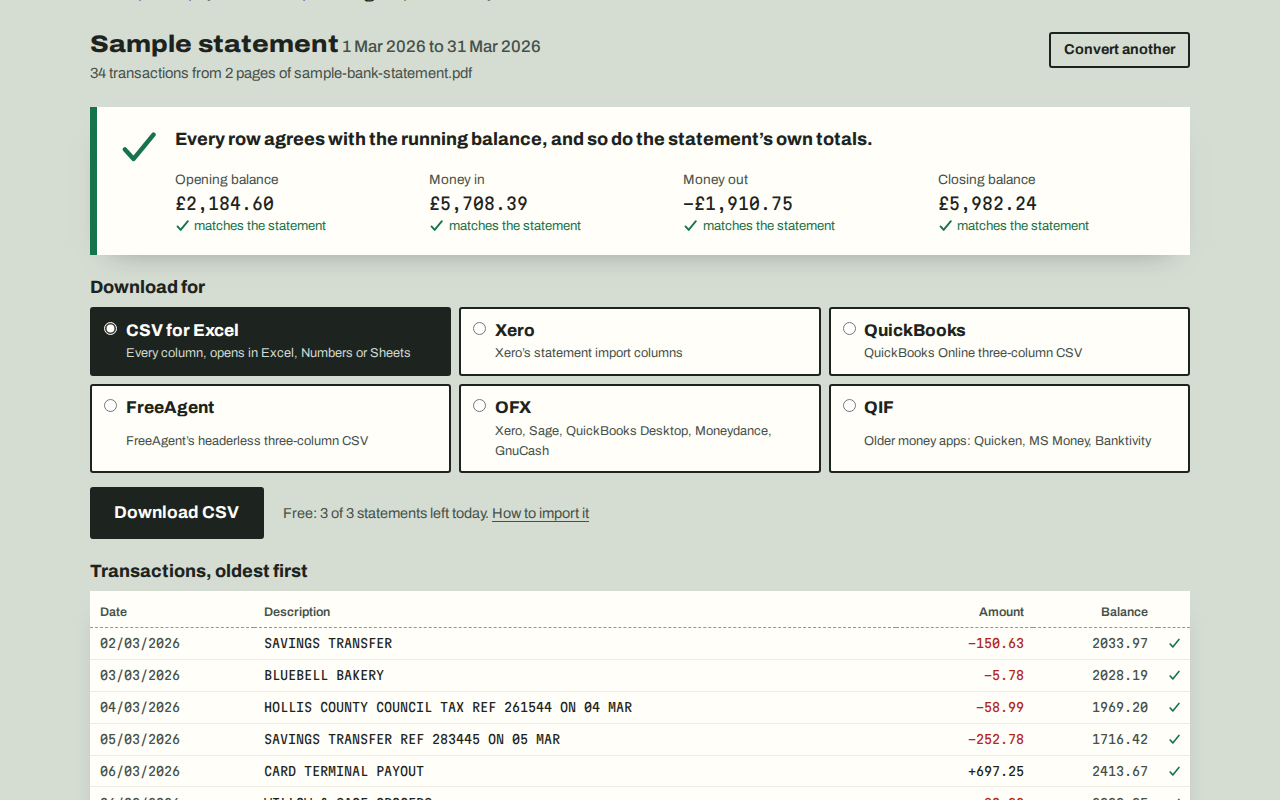
Each printed balance must equal the last one plus the transaction. Rows that don’t follow are crossed and listed, and marked in the file.
Ready for your software
CSV for Excel, Xero’s statement columns, QuickBooks’ three-column CSV, FreeAgent’s headerless CSV, OFX and QIF, with UK dates.
UK banks
Monzo and NatWest tested on real customer statements; HSBC, Lloyds and Barclays printouts on real published ones; others built from their published layouts.
Stays on your device
No account and no upload. The PDF is read by your browser, and the page can only contact our licence server and page counter.
Getting started
- Download the statement PDF from your online banking or banking app.
- Open statements.onibaku.co.uk and drop the PDF in, or try the sample statement.
- Check the ticks, choose your software and download the file.
Pricing
- Free: three statements a day, every format and every check.
- Pro, £8 a month or £69 a year: as many statements as you like, in up to three browsers. Cancel any time.
- Refunds within 14 days: email admin@onibaku.co.uk.
Privacy and terms
See the Brought Forward section of our privacy policy and terms. Brought Forward is independent and isn’t affiliated with any bank or accounting software.
Troubleshooting
- “This PDF is a picture of a statement”: it was scanned. Download the statement from online banking instead.
- Rows don’t agree: check them against the PDF; often a page is missing from the file. The report button sends only the bank’s name so the layout can be fixed.
- Lost your licence key: use “Lost your key?” in the Price section with the email you paid with.