ChatBundle
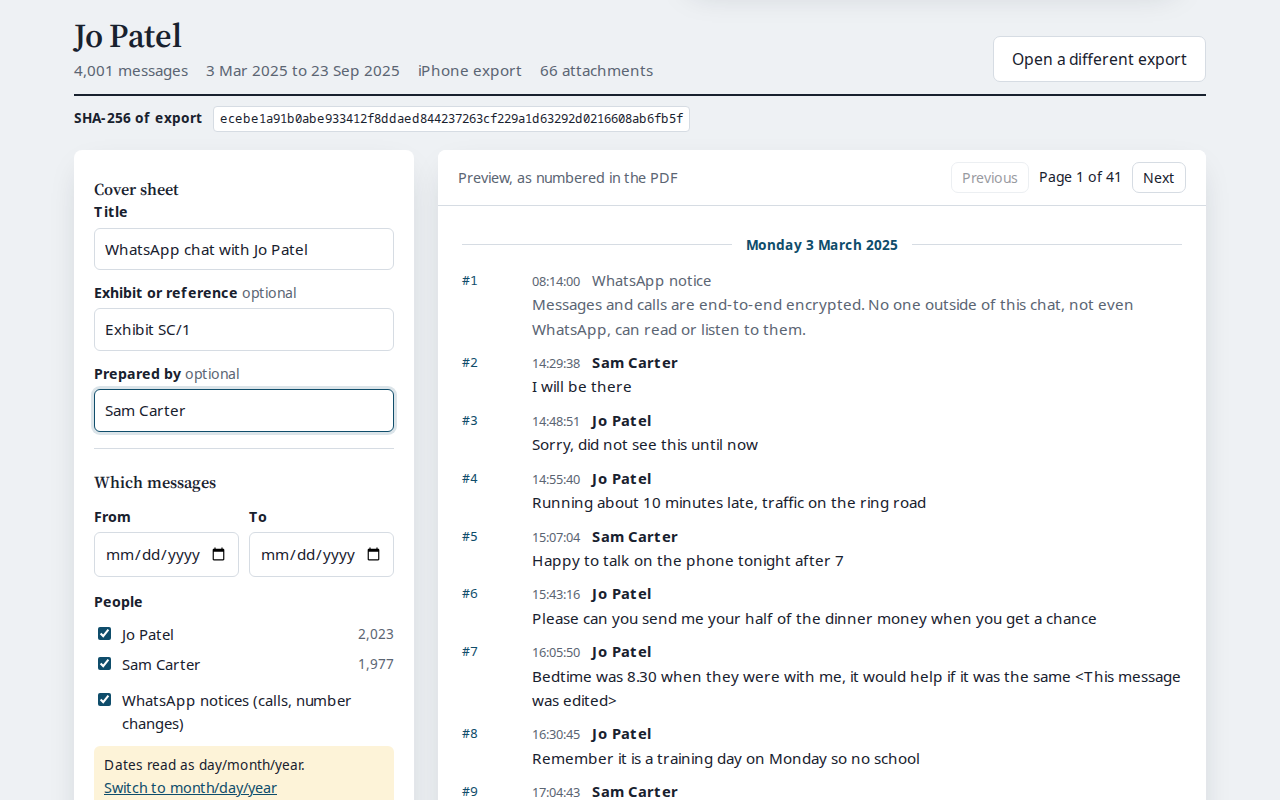
Turn a WhatsApp™ chat export into a numbered PDF for court, without uploading it. Every message numbered, dated and attributed, with a cover sheet, a media index and a SHA-256 fingerprint of the original export.
Numbered messages
Each message keeps its number from the export, so filtering by date or person never renumbers anything, and gaps are marked.
Cover sheet and index
Source file, date range, participants and filters on the cover, page X of Y on every page, and bookmarks by month.
Media index
Every attachment listed with the message it came with and its own SHA-256, with images shown in place if you want them.
Fingerprint
The SHA-256 of the export file, with instructions for checking it on Windows, Mac and Linux.
Nothing uploaded
The export is read and the PDF is made in your browser. A strict security policy stops the page sending your chat anywhere.
Any phone, any language
iPhone and Android exports, 12 and 24-hour clocks, and names and messages in any script, including Arabic, Chinese and emoji.
Getting started
- In WhatsApp, open the chat, choose Export chat and save the file (step by step for iPhone and Android).
- Open chatbundle.onibaku.co.uk and drop the .zip or .txt file onto the page.
- Add a title and exhibit reference, narrow the dates or people if you need to, and download the PDF.
Pricing
- Free: open and preview any export, filter it, and download a watermarked PDF of the first 100 selected messages.
- 7-day pass, £9.99, or 30-day pass, £39: unlimited full PDFs with no watermark until the pass ends. One payment, nothing renews, and buying again adds time to the same key.
- Refunds within 14 days: email admin@onibaku.co.uk.
Privacy and terms
See the ChatBundle section of our privacy policy and terms. ChatBundle doesn't give legal advice. WhatsApp is a trademark of WhatsApp LLC; ChatBundle is independent and not affiliated with it.
Troubleshooting
- "No messages found": make sure it's the file WhatsApp's Export chat made, not a backup or a screenshot. Unzipped folders work if you choose the .txt inside.
- Dates look wrong: if every day in the chat is 12 or under, ChatBundle has to guess between day/month and month/day. Use the switch under "Which messages".
- Lost your key: use "Have a pass?" on the page and enter the email you paid with.