Heading Numbering & Table of Contents
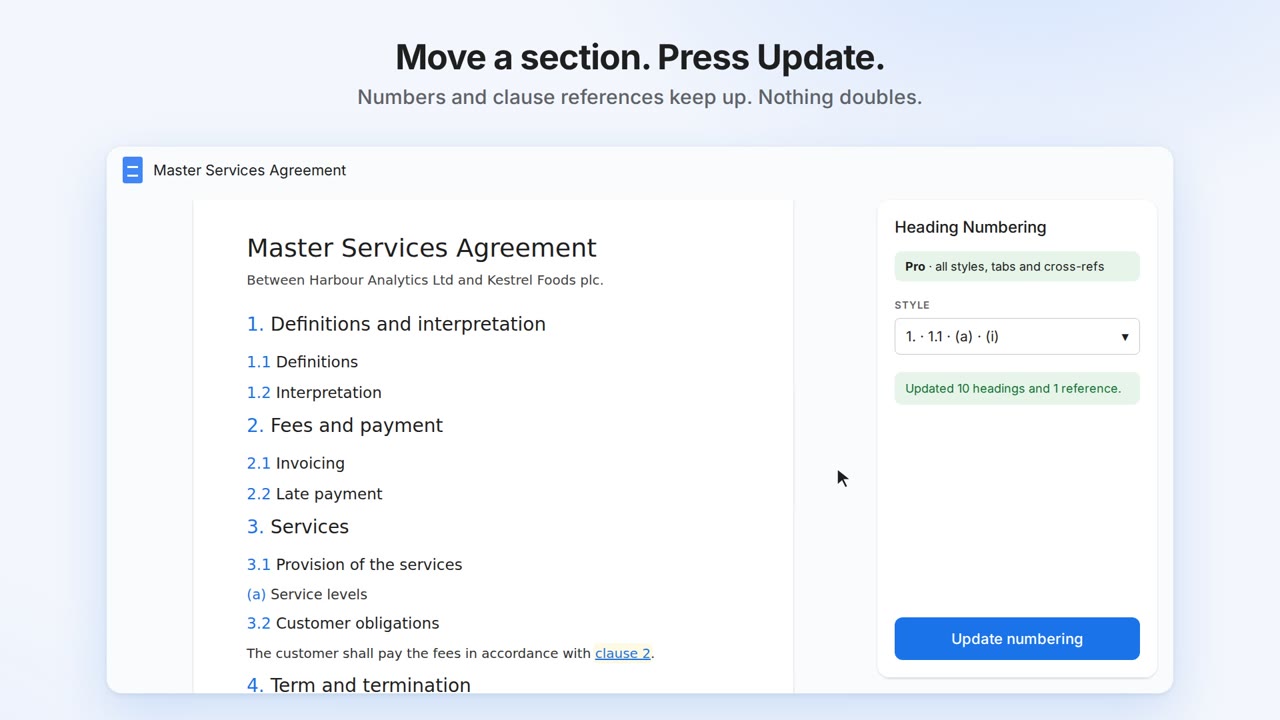
Numbered headings for Google Docs™: 1, 1.1, 1.1.1, or legal style with (a) and (i). Move a section and renumber in one click. References to clauses and sections update with it.
Renumber safely, as often as you like
Run it twice and nothing doubles. Move, add or delete headings and press Update: every number is recalculated. Headings like "2026 Budget" keep their own numbers.
Styles for real documents
Decimal, legal (1. · 1.1 · (a) · (i)), outline (I. · A. · 1.), chapters, or your own pattern per level, like Article %1 or Schedule %1.
Cross-references that keep up
Link to "clause 3.2(a)" from anywhere in the document. When the numbering changes, every reference changes with it, and any that point at a deleted heading are flagged.
Install from the Google Workspace Marketplace
See it in 30 seconds:
Getting started
- Give your section titles heading styles: Format → Paragraph styles → Heading 1, 2, 3.
- Choose Extensions → Heading Numbering & Table of Contents → Open.
- Pick a style and which heading levels to number. The preview shows the result before anything changes.
- Press Update numbering. Press it again whenever you've moved or added headings.
Numbers are ordinary text at the start of each heading, so they show in Google's outline, its table of contents, PDFs and Word exports. A non-breaking space follows each number: that's how the add-on recognises its own numbers and leaves the rest of your text alone. Remove takes them all off again.
Options
- Headings to number: for example Heading 2 to Heading 4, if your document uses Heading 1 as its title.
- Headings left unnumbered: Contents, Abstract, Acknowledgements, References and Bibliography by default, plus any you add. Headings under them stay unnumbered too.
- Typed numbers: if headings already start with numbers someone typed ("2.1 Scope"), the add-on says so and can replace them.
- After the number: a space, or a tab like Word uses.
- Tabs: number the tab you're in, or every tab at once (Pro), starting from 1 in each tab or carrying on.
- Empty headings, the Title style and headings already numbered by a Docs list are skipped. Problems such as a Heading 3 with no Heading 2 above it are listed in the sidebar.
Contents
On the Contents tab, choose how deep to go and whether to show numbers and links, then press Insert contents. A linked list of headings goes in below your cursor and refreshes every time you update the numbering. Google's own table of contents works alongside it: after renumbering, click Google's table and press its refresh button.
Cross-references (Pro)
Put your cursor where the reference should go, open the Outline tab, hover over a heading and press Ref. Choose the number ("3.2"), number and title ("3.2 Late payment") or title only, with an optional word in front such as clause or section. References are links, so readers can click through. If a heading they point at is deleted, they're highlighted in yellow and listed in the sidebar.
Plans
| Free | Pro | Team | |
|---|---|---|---|
| Decimal numbering, renumber and remove | Yes | Yes | Yes |
| Outline view and contents list | Yes | Yes | Yes |
| Legal, outline, chapter and custom styles | No | Yes | Yes |
| Every tab at once | No | Yes | Yes |
| Cross-references | No | Yes | Yes |
| Price | Free | $4 a month or $29 a year | $3 a person a month or $24 a year, from 3 people |
Upgrade from the sidebar. Payment is handled by Stripe, and Pro unlocks in the sidebar within a few seconds, on the Google account you upgraded from. The receipt page shows a licence key, which you can use to move Pro to a different Google account. Cancel or change your card any time from Manage subscription in the sidebar.
On a Team plan, colleagues with an email address at the same work domain as yours get a seat automatically the first time they open the add-on. Anyone else joins by entering the team's licence key under Have a licence key?. The buyer can see who has a seat, remove people and change the number of seats from the seats page linked on the receipt and in the sidebar.
Security and your data
- Only the current document. The add-on can only open the document you're using it in. It can't see your other files, Gmail or Drive.
- Your document stays in Google. Headings are read and numbered by Google Apps Script on Google's servers. Your text is never sent to Onibaku.
- One thing leaves Google: to check your plan, the add-on sends your Google account's email address to our licence server.
Details are in our privacy policy.
Help
A heading wasn't numbered
Check it uses a heading style (not just big bold text), that its level is in the range you chose, and that it isn't in the "don't number" list or under a heading that is. Hover over it in the preview to see why it was skipped.
Some headings have two numbers
One number was typed by hand. Tick Replace typed numbers in the sidebar and update. If the heading is part of a Docs numbered list, remove the list numbering with Format → Bullets & numbering first.
Small blue flags appeared next to my headings
Those are Google Docs bookmarks, which the contents list and cross-references link to. Docs shows them while you edit; they don't appear when the document is printed, exported to PDF or viewed by readers. Deleting one breaks the links to that heading, which the sidebar will point out. A contents list with Link to each heading turned off doesn't add any.
Google's table of contents shows old numbers
Google's table doesn't refresh by itself. Click it and press the refresh button that appears. The add-on's own contents list refreshes whenever you update the numbering.
I paid but the add-on still says Free
Reopen the sidebar on the Google account you upgraded from. If you paid from a different account, choose Have a licence key? and paste the key from your receipt page. Still stuck? Email admin@onibaku.co.uk with the email on your Stripe receipt and we'll sort it the same day.
It says a permission is missing
Google lets you untick permissions when installing. Press Allow access in the sidebar and tick everything, then press check again.
Guides
Found a bug, or want a feature? Email admin@onibaku.co.uk.
Google Docs™, Gmail™, Google Drive™ and Google Apps Script™ are trademarks of Google LLC. This add-on is not made or endorsed by Google.